Windows 11 Cloud Rebuild Can Reinstall the OS Without USB Media
Windows 11’s preview Cloud Rebuild downloads an installation image and drivers, with options to erase data and let IT admins start recovery remotely.



Windows 11’s new Cloud Rebuild option could make one of the more time-consuming PC recovery jobs simpler: reinstalling the operating system without first preparing a USB installer. In preview builds, Windows can download an installation image and device drivers through Windows Update, then use them to rebuild the system. The feature can also run when Windows won’t start, provided its Recovery Environment remains usable.
Cloud Rebuild is included in preview update KB5127936 for Windows 11 versions 25H2 and 26H2. That means it’s available to testers now, but the feature has not yet reached a general release. Microsoft hasn’t provided a wider availability date in the information accompanying the preview.
Recovery starts from the cloud
The practical change is that users no longer need to locate a separate Windows image or create installation media to reinstall Windows on an eligible PC. Cloud Rebuild retrieves the required image and device drivers over the internet. That makes the recovery option useful when a system needs a fresh installation but no prepared USB drive is at hand.
There is an important condition: Windows Recovery Environment, or WinRE, must still be available. The feature is designed to help even if Windows itself cannot boot, but it relies on that recovery environment to start the process. If WinRE cannot be used, the described Cloud Rebuild route won’t be available.
This option is aimed at reinstalling Windows on an existing device. It doesn’t remove the need for installation media when setting up a new system, according to the feature details. For PC owners, that distinction puts Cloud Rebuild in the recovery and refresh toolkit rather than making it a universal replacement for bootable installers.
Choose what happens to the data
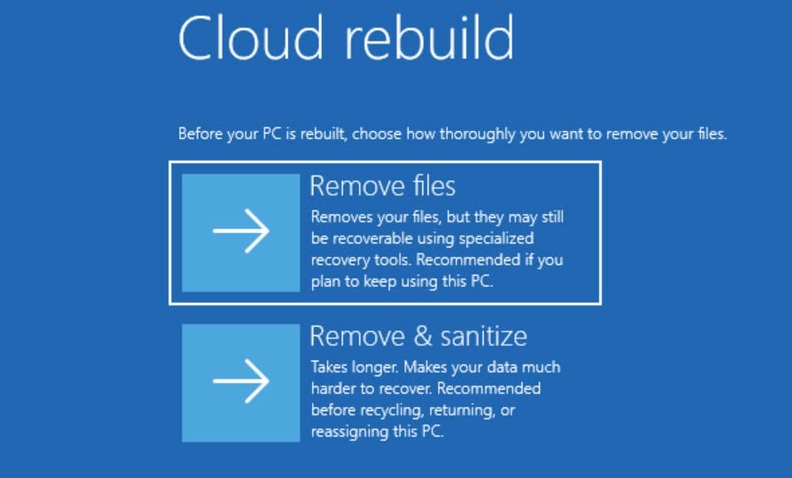
Cloud Rebuild overwrites the existing Windows installation, so users should expect their files to be removed. The feature offers a choice between removing files and securely erasing data before Windows is installed again. The secure erase uses the storage hardware’s erase capability, takes longer, and is irreversible.
Those options serve different recovery needs. Removing files is presented as one route for rebuilding the PC; sanitization is the more thorough choice when the goal is to erase stored data as well. Since the latter cannot be undone, it calls for care: once the erase has taken place, the removed data can’t be restored through this process. The available description does not spell out a way to recover files after either choice, so users should treat the reinstall as destructive and preserve anything they need beforehand.
For someone refreshing a PC for continued use, the key consideration is whether important personal files are backed up before starting. For a device that is being cleared, the secure erase option may better fit the task, though it adds time. In either case, Cloud Rebuild addresses the Windows installation itself; users should not mistake it for a way to keep an existing setup intact while repairing it.
Remote recovery for managed PCs
The feature also has a route for IT administrators. Through the Recovery CSP, administrators can configure and start a Cloud Rebuild remotely. They can use the build already installed on a device or specify a target build. That gives managed environments a way to initiate the reinstall process without requiring someone to prepare custom installation media for each recovery.
Remote control adds a deployment consideration for IT teams: they can choose which build the recovery process targets, while the system still needs the recovery components and connectivity required for the cloud download. The preview description doesn’t detail the network requirements or the full set of administrative controls, so those specifics will matter as teams assess the feature in practice.
For individual users, the attraction is straightforward: a Windows reinstall could take fewer preparation steps when the PC can reach Windows Update and WinRE is working. For administrators, remote configuration and build selection may make recovery easier to coordinate across managed devices. Both uses depend on the feature arriving beyond preview and on the recovery environment being available when needed.
Cloud Rebuild is currently limited to Windows 11 preview builds covered by KB5127936. Its promise is a more convenient path to reinstalling an existing PC, with a clear tradeoff: the current Windows installation and its files are erased. The next thing to watch is when Microsoft makes the option broadly available and how the recovery flow works on a range of devices.
Join the discussion on Windows 11’s new Cloud Rebuild feature on the OC3D Forums.