Huss Valley Codes for November 2026: Free Spins, Gems and Halloween Rewards
Redeem seven Huss Valley codes for candy corn, coins, boosts, gems, an emote and wheel spins. The list was updated October 28, 2026.

Huss Valley’s latest codes bring Halloween rewards into the Roblox game, with candy corn and coins joined by a ghost key, wheel spins and timed boosts. The newest entry, GhostKey, gives players one ghost key and 250 candy corn, making it the most direct option for anyone chasing the event’s seasonal items. If you’re collecting Halloween currency or building up resources for character customizations, it’s a useful addition to redeem early. Codes can change or stop working, so it’s sensible to claim the listed rewards while they’re available rather than leave them sitting in a menu.


The list below was updated on October 28, 2026. It includes seven codes, with rewards ranging from Halloween currency to gems, emotes and a title. Codes can be entered one at a time through the game menu, so check each one rather than assuming a single redemption will claim everything. That distinction matters here: the rewards are attached to separate entries, and some overlap while others offer entirely different items.
Active Huss Valley codes and rewards
| Code | Reward |
|---|---|
| GhostKey | One ghost key and 250 candy corn |
| TRICKORTREAT | 500 coins and 150 candy corn |
| INFECTION | 150 candy corn and 500 coins |
| CANDY | 10 candy corn and 500 coins |
| TUESDAYSROCK | Five wheel spins |
| HUSS4CODE | Two 15-minute coin boosts, two 15-minute gem boosts and a title |
| FIRSTCODEEVER | Two 15-minute gem boosts, 100 gems and an emote |
The Halloween codes make up the strongest seasonal cluster: GhostKey, TRICKORTREAT, INFECTION and CANDY all award candy corn, while the first also includes a ghost key. TRICKORTREAT and INFECTION offer the same listed amounts of coins and candy corn, though their code names differ. CANDY gives less seasonal currency, but still adds coins. The coin rewards can help with in-game purchases, while the gem and coin boosts give players a timed way to increase resource gains. TUESDAYSROCK takes a different route, offering five wheel spins instead of currency or boosts.
Those rewards serve different purposes. Spins give players a chance to use the game’s wheel, while gems and coins support progression and purchases. The boosts run for 15 minutes apiece, so redeem them when you’re ready to play and can make use of their timed effect. HUSS4CODE supplies both kinds of boost, while FIRSTCODEEVER focuses on gems and adds an emote. Titles and emotes also offer ways to personalize a character beyond the standard store options. Small cosmetic rewards won’t matter to every player, but they give these codes some value even after the currency is spent.
Here’s the thing: the list is useful because it mixes immediate rewards with items that need a little planning. Candy corn and coins are straightforward additions to your balance; timed boosts are only helpful if you’re playing during their active window. If you’re logging in just to redeem codes, claim the boosts when you expect to stay in the game. Otherwise, you may start their timers before you’re in a position to benefit. A little timing matters.
How to redeem Huss Valley codes
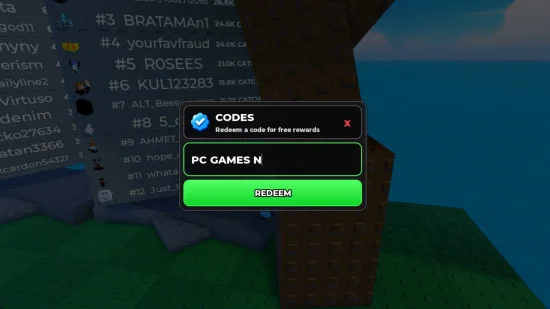
Redemption happens inside the Roblox game. Open the menu on the left side of the screen, select “codes,” then enter a code in the box. You can copy and paste each one or type it in manually; submit them individually to claim the listed rewards. The process is simple, but entering each code separately gives you a clear point to check whether it was accepted before moving on.
- Launch Huss Valley in Roblox.
- Open the menu on the left side of the screen.
- Select “codes.”
- Enter one code in the box, either by typing or pasting it.
- Repeat for the remaining codes and use the rewards in game.
Keep the spelling and capitalization shown in the list when entering a code. Redeeming one at a time also makes it easier to see which rewards have been claimed. With several entries offering overlapping candy corn and coin rewards, checking each result helps you keep track of what each code adds. If an entry doesn’t work, double-check what you typed and try submitting it on its own; that makes it easier to spot a typo or an issue with a particular code.
What the reward mix means for players
The code set is doing more than handing out a single batch of seasonal currency. It gives players several ways to add resources, plus a few rewards aimed at customization and the game’s wheel. That variety can encourage a return visit: one player may want candy corn, while another is more interested in boosts, an emote or a title. This is more significant than it looks for a small code list, because the rewards give different kinds of players a reason to check the menu.
And yet, the value depends on how you play. A boost has a short window, and wheel spins are only appealing if you want to use that feature. If you’re working in this space as a player trying to make the most of a limited session, prioritize the rewards you’ll actually use and save timed boosts for active play. The candy corn entries are easier to claim without planning, while the boost codes reward a bit more attention to timing (and this is the part most people overlook).
Where to find Huss Valley updates
The Huss Valley game page links to a Discord server where players can talk, join voice channels and find information about different parts of the game. It’s also a place to seek help from the team. Community spaces can be useful for spotting changes, but they don’t guarantee a predictable code schedule. There’s no release schedule listed, so checking those spaces and revisiting this list are practical ways to catch additions.
We’ll update the code list when new entries appear and have been checked. In the meantime, redeem the Halloween rewards while they’re available, then use the timed boosts during a play session to get the most from their 15-minute duration. If the list changes, the reward table should make it easy to see what’s new and whether an entry fills a gap in your current stash.
Follow PCGN on Google for more game code guides.